8 posts tagged with "content"

View All Tags

· 5 min read
Martijn Smit

In a world buzzing with distractions, notifications, and tasks competing for your attention, distinguishing what truly matters can feel like an insurmountable challenge. If you're a productivity enthusiast or someone perpetually drowning in a sea of to-dos, fear not! The solution lies in simplifying your approach. Welcome to the philosophy of focusing on 'one-thing' per day. By leveraging this method, not only will you boost your productivity, but you'll also gain deeper insights into the metrics that truly matter in your quest for efficiency.

The Paradox of Choice

Before diving into the nitty-gritty of the 'one-thing' productivity method, let's address a common productivity pitfall: the paradox of choice. In theory, having a myriad of options should make us happier. But in reality, it often leaves us overwhelmed. The constant juggle between tasks dilutes our focus and impacts the quality of our output.

featured image

Barry Schwartz, author of "The Paradox of Choice", posits that too many choices can paralyze rather than empower. If you're scrolling through an endless task list, your brain is more likely to short-circuit than streamline. The solution? Mindful elimination. By homing in on a single important task daily, we reduce decision fatigue, thereby enhancing our overall productivity and sense of accomplishment.

The Power of Prioritization

The concept of prioritization can be traced back to the Pareto Principle, often referred to as the 80/20 Rule. According to this principle, 80% of results come from 20% of your activities. For productivity geeks, this implies that a handful of high-impact tasks yield the majority of your results.

Laura Vanderkam, productivity expert and author, emphasizes the importance of identifying these high-leverage activities. But how do you pinpoint them?

  1. Identify Your Core Goals: What are you aiming to achieve, both in the short and long term? Clarity of purpose enables better prioritization.

  2. Analyze Past Performance: Tools like WhatPulse can help. Monitor your keyboard and mouse usage to identify patterns in productivity. Are certain activities yielding higher productivity spikes? Focus on those.

  3. Time Budgeting: Allocate blocks of time for these high-priority tasks. Use the Pomodoro Technique to stay disciplined.

The 'One-Thing' Focus

Now, let's zoom in on the crux of this productivity strategy: focusing on one key task per day. This concept, popularized by Gary Keller in his book "The ONE Thing", advocates that focusing on the singular task that makes other tasks easier or unnecessary is the key to moving mountains in your personal and professional life.

How to Implement This

  1. Daily Reflection: Each day, take a few moments to reflect on what task will have the most significant impact. This reflection should take place preferably the night before or first thing in the morning.

  2. Set Clear Objectives: Define what success looks like for the day. This clarity acts as a compass, steering you towards meaningful progress.

  3. Break It Down: Split the 'one-thing' into manageable chunks. Let's say your task is to write a blog post—ahem—break it into an outline, first draft, editing, and final review phases.

  4. Eliminate Distractions: Close those ubiquitous social media tabs. Silence non-essential notifications. According to productivity studies, these disruptions can cost you up to 23 minutes to regain focus.

  5. Track Progress: Tools like WhatPulse can quantify your activity and keep you accountable. Seeing your stats can be an excellent motivator.

  6. Review and Adjust: At the end of the day, evaluate your performance. Did you achieve your 'one-thing'? If not, what impediments stood in your way? This iterative process allows you to refine your approach continually.

Leveraging Technology

In this digitized era, manual tracking feels like cooking a gourmet meal using a caveman’s toolkit. Enter WhatPulse, an indispensable companion for any productivity aficionado. WhatPulse offers detailed insights into application usage, allowing you to analyze where and how your time is being spent.
Activity Tracking Made Easy with WhatPulse Statistics

Maximizing WhatPulse for 'One-Thing':

  • Actionable Insights: Identify periods of peak productivity. Aim to schedule your 'one-thing' during these windows.
  • Reduction of Redundancies: Track unnecessary clicks or keystrokes to simplify your workflow.
  • Comparative Analysis: Measure your performance on 'one-thing' days versus multi-tasking days. The metrics will speak for themselves—focus trumps frenzy.

Continuous Improvement

The 'one-thing' philosophy isn't a set-it-and-forget-it solution. It requires ongoing commitment and refinement.

  • Kaizen Approach: Originally a Japanese business philosophy, Kaizen focuses on continuous improvement. Implement small, incremental changes to make your 'one-thing' focus more effective over time.
  • Feedback Loop: Engage with peers, mentors, or even productivity forums. External perspectives can offer invaluable input and shed light on blind spots.
  • Mindfulness: Incorporate mindfulness practices like meditation or deep work sessions. These techniques enhance focus and mitigate the risk of burnout.

The Road to Mastery

Mastering productivity is akin to mastering an instrument—practice, feedback, and persistence are non-negotiable. The 'one-thing' method simplifies this journey, granting you the cognitive liberty to focus on what truly matters. For those obsessed with numbers and optimization, the quantifiable metrics provided by WhatPulse can transform your productivity strategy into a data-driven masterpiece.

You don't have to climb Mount Everest to feel accomplished. Sometimes, the vista from a well-climbed hill can be equally satisfying. Remember, meaningful productivity isn't about doing more; it's about doing what matters most.

· 3 min read
Ash Pearson

Not long ago, Discord was seen as the place for gamers to chat. However, since the pandemic, Discord has experienced strong growth in servers covering a wide range of topics. This growth has led to the launch of many new and exciting servers, fostering quality discussions in various categories. This article focuses on a growing trend: Productivity.

We have compiled a list of some of the best Discord servers to join, aiming to provide you with the productivity boost you need to get through the workweek, help with project management and prioritization, and avoid dangerous procrastination.

Top Discord Productivity Servers.

Tools for Thought:

First up is Tools for Thought, a Discord server that focuses on the best tools available to professionals and how to make the most out of them to enhance productivity. While it previously focused mainly on Notion, the server has expanded to include discussions on a wide range of different tools. This server is a fantastic resource for discovering new tools that can transform you into a productivity ninja.

Link to Discord: https://discord.com/invite/hGNfbtRPS5

Productivity Cafe:

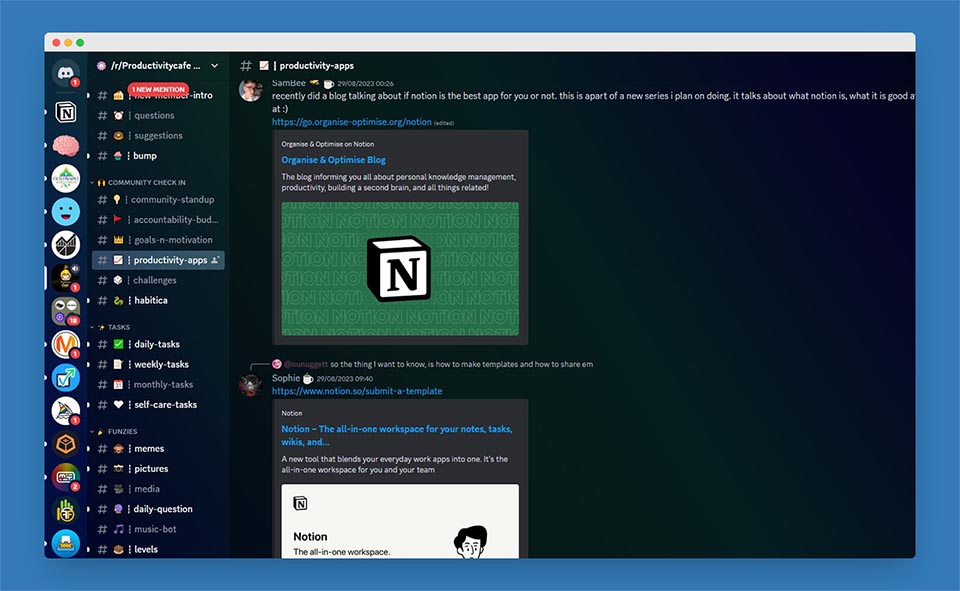
Productivity Cafe is a growing Discord server with an active user base and a strong emphasis on community, self-improvement, accountability, and productivity. You can find an accountability partner, publicly track your daily and weekly to-dos, and participate in movie nights to connect with the community once your workday is complete. They describe themselves as a group of caffeine-fueled productivity wizards on a mission to conquer the dragons of distraction. Unleash your potential and check out this server.

Link to Discord: https://discord.gg/DXdK4WUPWe

Activity Tracking Made Easy with WhatPulse Statistics

/r/Productivity:

As the server name suggests, this Discord originated from the popular and active Reddit community dedicated to all things productivity. While Reddit is excellent for longer discussions, their Discord server is a hive of live activity when it comes to discussing productivity. It offers channels dedicated to recommending and discussing the best apps, books, systems, websites, and project management tools, as well as channels focused on self-improvement and motivation. If productivity is your thing, joining this server is definitely worthwhile.

Link to Discord: https://discord.com/invite/productivity

Notion:

Notion has become the all-in-one solution for many businesses and professionals, serving as an internal documentation platform, wiki, and even handling more advanced functions such as content calendar management, finances, and budgeting. Not surprisingly, Notion has its very own Discord server that focuses on making the most out of Notion, helping you become more productive. The server provides tips on commands, resources, and templates that can assist you in maximizing the potential of this amazing tool.

Link to Discord: https://discord.com/invite/notion

WhatPulse:

Last but not least, we can't miss mentioning our very own Discord server for WhatPulse, which includes a dedicated channel for all things productivity. In this server, you can chat and learn about the tools used by our most productive WhatPulse users to help them make the most of their working week and improve their stats.

Link to Discord: https://discord.com/invite/FtddS6Fwve

· 4 min read
Martijn Smit

Introduction

Hi, I’m Ammar (or AA0000). I’m from Syria, and I’m 21. Back in 2017, I used to have way too much free time on my hands. I spent a lot of that time playing Minecraft, managing servers and creating plugins for them, texting with friends, playing Piano Tiles 2 and Dancing Line, learning HTML and CSS, and helping others with their servers on Discord, Slack, HelpDesk, and a forum, 11–13h a day, every day, all on my phone, Sony M2, for about two years.

I also used to play a game called Fast Type. It’s a typing test thing but for mobile, and I used to type relatively fast with just two fingers. The average typing speed on a PC with 10 fingers is about 40 words per minute (WPM). I used to type 78 WPM with just my thumbs, on mobile, and the world record for that was 93 WPM, I wanted to beat that record.

All of this was just too much for just two fingers. Especially when you don’t rest, in addition to me being quite underweight back then, I started to develop Tendonitis.

What Happened

It started with my thumbs stiffening after typing and making a loud noise when I tried to move them afterward, then it developed into pain. With time the pain started becoming more severe relentlessly and it started to last a lot longer, even after not using my thumbs. I went to a pharmacy and they told me that I just needed to rest. After seeing 5 different doctors over 4 years, while the pain only got worse, I have only been prescribed pain killers. Not knowing that it was only painkillers, I continued using my hands. I started doing freelance translating, which only made things worse. I had to start monitoring my hands’ usage to reduce it.

Activity Tracking Made Easy with WhatPulse Statistics

Start Monitoring

When looking for programs that could give me the right data, I came across WhatPulse around 2020. Ever since, I used to look at my PC usage every single day to see how much I used the keyboard and mouse, which programs I used the most, and then try to reduce my usage and time on those programs.

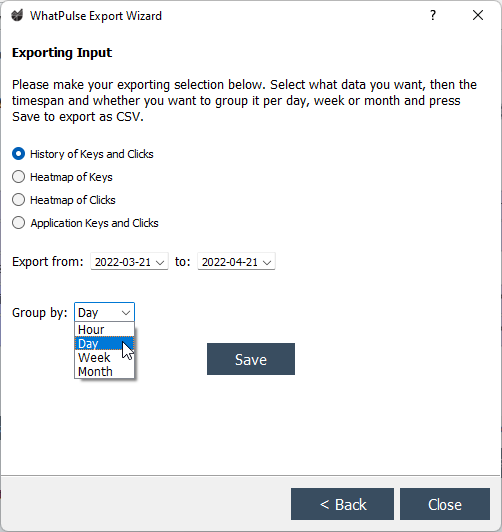
To make things easier, I started inputting the total keys into a sheet every day to compare my usage over time. But that was a lot of work, and I wanted an easier method. That’s where WhatPulse’s export wizard helped me out. It can export the usage grouped by different periods and can go as granular as per hour:

Export WizardExport Wizard

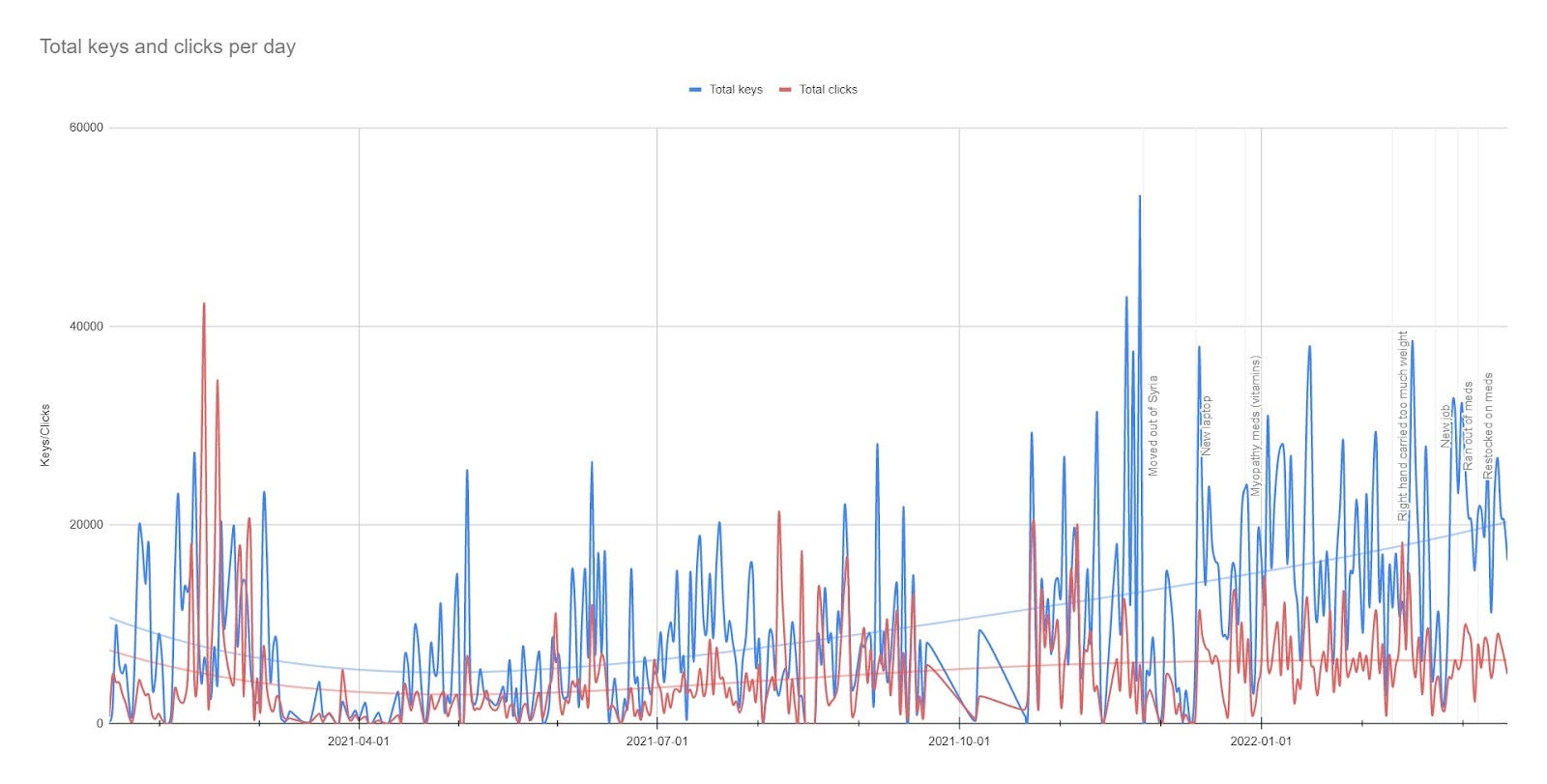
It is a Premium feature, and due to super low salary rates in Syria (around $36 a month), I couldn’t afford it, so I made a deal with the developer to translate WhatPulse to Arabic in exchange for the membership. After debating at what granularity I wanted to monitor my usage, I decided on daily and then I made a Google Sheet containing all of the exported stats and created this chart off that data:

Note that I wanted to list all of my data history, and the WhatPulse dashboards don’t go back that far yet. If you want to try this yourself, you can find the Google Sheet here.

In Nov 2021, right after that giant blue spike, the pain started to get severely out of hand, and I saw a very expensive specialist. They told me I could be suffering from Myopathy and they gave me vitamins and supplements, not just pain killers. After starting these medications, I wanted to compare my usage over time to see if they helped me more than the painkillers.

And indeed they did; you can see my usage progressively spiking in the end! Of course, while keeping the pain under control.

Nowadays, I’m at 130 words per minute on PC using Dvorak, and I’m trying to reach a healthy weight and overcome myopathy. I’m also planning on buying an ergonomic keyboard in the future, like the ZSA Moonlander or Kinesis 360, and see if I can improve my productivity even further.

Regards, Ammar.

Conclusion

Ammar’s story is one of the reasons WhatPulse exists; to monitor your productivity in different scenarios. I hope you found his story inspirational just like I did.

Do you have a similar story? I’d love to share it. Contact me at martijn@whatpulse.org.